Construction Job Costing: The Complete Guide
September 4, 2026
A millwork shop owner on WOODWEB put it plainly after spot-checking his projects at what looked like an 18 to 22 percent margin: "Don't ask me where that money is."
That is the whole problem in one sentence. Most contractors do not lose money because they can't build. They lose it because the job ends, the deposits and the supply-house runs blur together, and nobody can say what any single job actually made. On the forums where contractors talk to each other, the same lines come up year after year: working for lunch money. Busy but not profitable. Where did the money go.
Job costing is the fix. It is not accounting software and it is not a personality trait. It is a habit: put every dollar a job eats onto that job, while the job is running, so the number you see mid-job is the number that shows up at the end.
This guide walks the whole system: the five cost buckets, the labor-burden math most bids get wrong, markup versus margin, a minimum system you can run this week, and one fully worked job so you can see where profit hides. Every dollar figure in our worked examples is demo math for illustration, not a market rate.
1. What job costing actually is
Job costing means tracking costs by job instead of by month. Your P&L tells you the company made $12,000 in March. It cannot tell you that, say, the Hendersons' addition made $15,000 while the office remodel quietly lost $3,000 the same month. Job costing can.
Two kinds of cost go into it:
- Direct costs live on one job: crew hours, lumber, the plumber you subbed, the skid steer rental.
- Indirect costs (overhead) keep the company alive but belong to no single job: the shop lease, trucks, insurance, your office manager, estimating time, the software bill.
The classic failure is counting only direct costs. A heating contractor on Heating Help said it best back in 2005: "Charging $100 per hour does no good if it costs $110 per hour to run your shop." The dollar figures are dated; the principle is not. Jobs that "made money" on direct costs go on quietly starving the company that built them.
2. The five buckets every job cost lives in
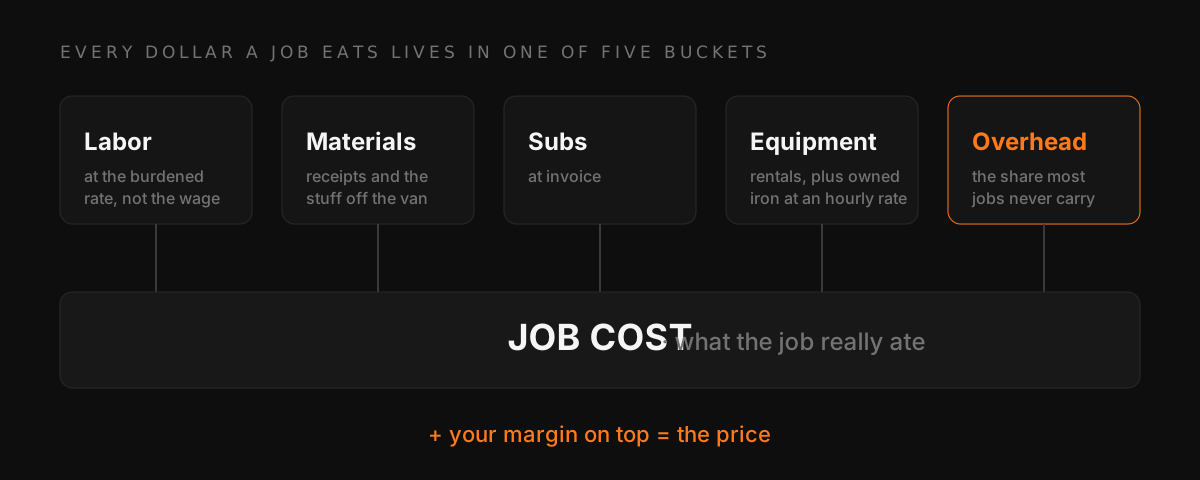
- Labor at its burdened cost, not the wage (section 3).
- Materials, including the ones that walk off the shelf of the van. An electrician on ElectricianTalk asking for a tracking system named exactly this leak: the material "they take from the van or from the shop" that never lands on a job.
- Subcontractors, at invoice.
- Equipment: rentals at invoice, owned iron at an hourly rate you set for it.
- Overhead share: a slice of company overhead applied to every job, so the jobs collectively pay the bills (section 6 shows the math).
If you track only buckets 2 and 3, which is what a folder of receipts gives you, the two biggest lies stay hidden: what your crew's hours really cost, and the overhead each job was supposed to carry.
3. Labor burden: what an hour of crew time really costs
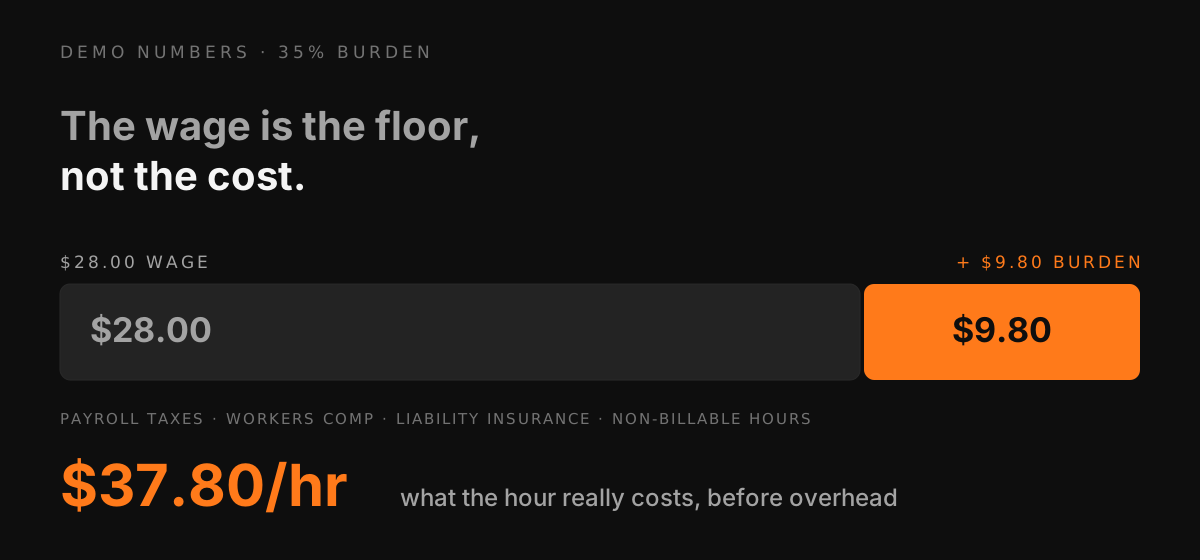
The wage is the floor, not the cost. On top of every hour you also pay employer payroll taxes, workers comp (a big line in California, and it swings hard by trade), liability insurance tied to payroll, and any PTO, phones, or small benefits. Then the hours your crew is on the clock but not on a billable job (shop time, yard runs, training) have to be carried by the hours that are.
Contractors land all over a wide range when they compare notes. In a Reddit thread asking what crews really cost, a Hawaii contractor figures construction burden at 40 to 50 percent while a poster from a large masonry sub reports wage plus 28.5 percent, and an electrician in a Mike Holt thread on employee costs reports around 25 percent plus payroll tax. The old-timer shorthand, take their base pay and double it, exists for a reason once overhead joins the party.
Demo numbers: a $28/hr carpenter at a 35 percent burden costs $37.80/hr before overhead. Run a 3-man crew at that spread through a job that takes 240 total crew hours and the labor line is $9,072, not the $6,720 the wages suggest. That $2,352 gap is invisible on a bid built from wages, and it comes straight out of what you thought was profit.
Your real burden is knowable from your own numbers: last year's payroll taxes, comp premium, and insurance against last year's field wages. The Job Costing Calculator has a burden input so you can bid with the loaded rate instead of the wage.
4. Markup and margin are not the same number
This one mistake shows up in more forum threads than any other. A one-man cabinet shop on WOODWEB marking materials up 10 percent was asked, "Do you know the difference between markup and margin?" His answer: "No I don't know the difference... So I thought maybe I was over charging."
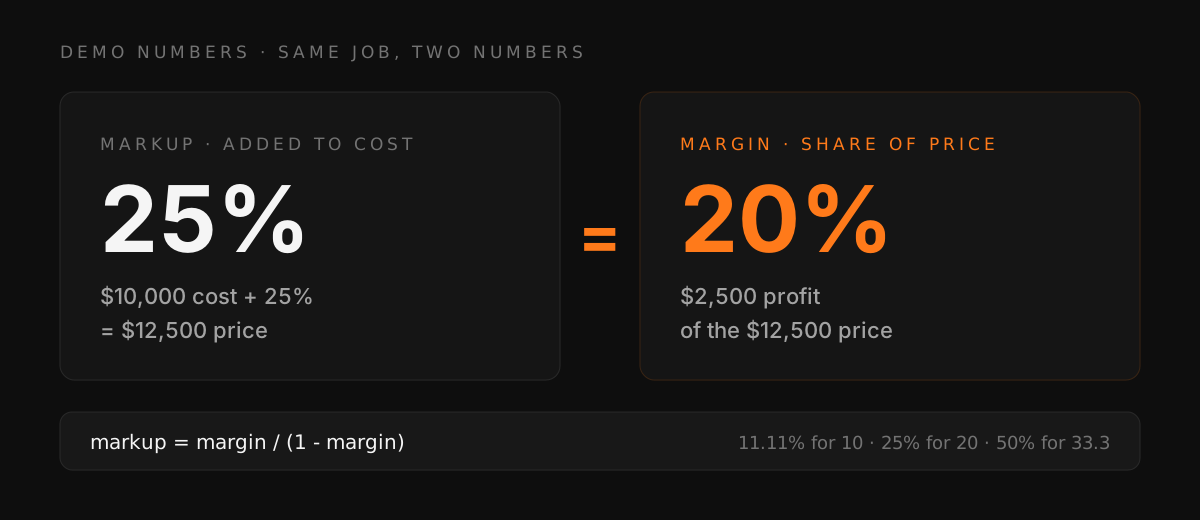
- Markup is added to cost. Cost $10,000, markup 25 percent, price $12,500.
- Margin is the share of the price that is profit. That same job's margin is $2,500 of $12,500, which is 20 percent, not 25.
The identity: markup = margin / (1 - margin). To make a 10 percent margin you need an 11.11 percent markup. To make 20 you need 25. To make a 33.3 percent margin (one third of the price) you need a 50 percent markup. Price with the wrong one and every job silently underpays you.
The Contractor Markup Calculator converts in both directions and shows the price you need for the margin you want. The Profit Margin Calculator does the reverse: it tells you what a finished job actually made.
5. The minimum job-costing system (no new software required)
You can start this with a spreadsheet and a Friday habit. If you want a head start, the free job costing spreadsheet has this exact budget vs actual math built in. The system fails at the inputs, not the math, so the rules are about inputs:
- Give every job a name and a budget by bucket the day you win it. The budget is your estimate: labor hours at the burdened rate, materials, subs, equipment, overhead share, and your margin on top.
- Cost code lightly. Five to ten codes, not fifty. Labor, concrete/framing/finish if you want phases, materials, subs, equipment. Codes nobody uses are worse than none. As one electrician put it about QuickBooks job reports: "garbage in: garbage out."
- Hours go onto a job the day they happen. This is the input that dies first. If crew hours reach the books as one weekly blob, you have payroll, but you do not have job costs. Every hour needs a job name on it. (This is the exact gap SiteOps was built for: crews clock in at the site with GPS, so the hours arrive already attached to the right job. More on that in our GPS time tracking post.)
- Receipts get a job name at the counter, not at tax time. The supply-house run you cannot place three weeks later lands on no job, which means it lands on your margin.
- Every Friday, estimate vs actual. Ten minutes per open job: budget next to spent, by bucket. A job going over on labor at 40 percent complete is a conversation you can still have. At 100 percent complete it is just a bad number, and as the sitework contractor said about the job that "should have been VERY good for us": "We barely made it out with our skin."
SiteOps handles the inputs for steps 3 and 4, and the running job profit and loss gives you the actuals for step 5's Friday review. Crews clock in with GPS at the job site so hours land on the right job, and receipts get a job name in the field. Start a 14-day free trial.
6. Overhead: making every job pay its share
Add up a year of overhead: shop, trucks, insurance not tied to payroll, office wages, phones, software, your own salary for the hours you do not swing a hammer. Then pick one allocation method and stick with it:
- Percent of direct costs (simplest): overhead ÷ annual direct costs. Demo numbers: $180,000 overhead against $1.2M of direct job costs is 15 percent, so a job with $22,572 of direct cost carries $3,386 of overhead.
- Per labor hour (better for labor-heavy shops): overhead ÷ annual billable field hours. $180,000 across 12,000 field hours means every crew hour must carry $15 of overhead before profit exists.
Either works. Having neither is how a shop stays busy for years while, as one Festool forum carpenter warned a new owner, "There is a big difference between being busy and being profitable."
7. One fully worked job (demo math)
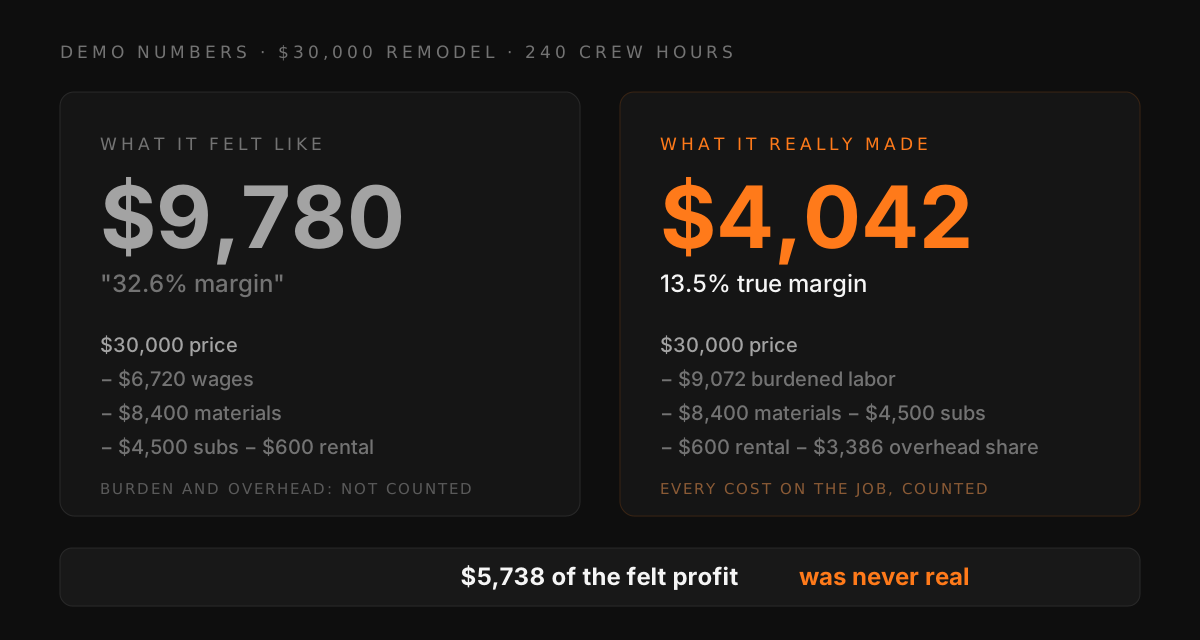
A $30,000 remodel. Three-man crew, 240 total crew hours. The graphic at the top of this page is this table.
| Line | What the owner "feels" | Real job cost |
|---|---|---|
| Contract price | $30,000 | $30,000 |
| Crew wages (240 hrs, avg $28) | $6,720 | see burdened labor |
| Burdened labor (35% burden) | not counted | $9,072 |
| Materials | $8,400 | $8,400 |
| Subs (plumbing + electrical) | $4,500 | $4,500 |
| Equipment rental | $600 | $600 |
| Overhead share (15% of direct) | not counted | $3,386 |
| "Profit" | $9,780 (32.6%) | $4,042 (13.5%) |
Same job. The felt number is more than double the real one. Nothing was stolen and nobody slacked: $2,352 of burden and $3,386 of overhead were simply invisible. Now imagine the crew runs 30 hours over and there is one unbilled "while you're in there" extra, and you can see how a job that felt fat goes to zero without anyone noticing. This is what contractors mean when they say they found out at the end. A GC replying in a BiggerPockets thread about a contractor losing money mid-job put it this way: if a GC does not know his costs, "he will lose his shorts on a rehab."
Run your own version of this math in the Job Costing Calculator. It builds the burdened labor line, the overhead share, and the margin for you. And for the finished-job version of this exercise, walked step by step on a different demo job, see How to Calculate Profit on a Construction Job.
FAQ
What is job costing in construction? Tracking every cost a specific job creates (labor at burdened rates, materials, subcontractors, equipment, and an overhead share) against that job's budget, while the job is running, so you know what the job made rather than guessing after it closes.
What is the difference between markup and margin? Markup is a percentage added to cost. Margin is the percentage of the final price that is profit. A 25 percent markup produces a 20 percent margin. The conversion is markup = margin / (1 - margin).
What is a good profit margin for a construction job? There is no universal number. When an excavation contractor asked exactly this on Heavy Equipment Forums, the answers ranged from 10 to 45 percent. The honest answer is: enough to cover your real overhead share plus the profit you decided the company should earn. Work it from your own overhead with the Profit Margin Calculator rather than borrowing a competitor's guess.
What is labor burden? Everything an employee hour costs beyond the wage: employer payroll taxes, workers comp, liability insurance, benefits, and the load from paid hours that are not billable. It varies widely by trade and state; the Reddit and Mike Holt threads linked in section 3 show real contractors reporting anywhere from about 25 percent above wage to 50 percent. Work yours out from last year's actual bills.
Do I need software for job costing? No. A spreadsheet, light cost codes, and a Friday review work at small scale. What kills the spreadsheet is field data: hours and receipts that never get a job name. Fix the inputs first; add software when updating the spreadsheet becomes the bottleneck.
How often should I update job costs? Weekly at minimum while a job runs. Cost data you only see after the job closes cannot change anything.
This article is general information for contractors, not accounting, tax, or legal advice. Rates and percentages shown in worked examples are demonstration numbers. Talk to your accountant about your company's real burden, overhead, and pricing.